Software has not changed much on such a fundamental level for 70 years. And then it's changed I think about twice quite rapidly in the last few years. And so there's just a huge amount of work to do, a huge amount of software to write and rewrite.
— Andrej Karpathy (creator of the term "vibe coding")
We are on the eve of a major shift in the approach to programming. I'm Patryk Zych, a Senior Frontend Developer, and I don't know if it will happen this year or in the coming ones — but we certainly must change our approach to this craft :) But let's start from the beginning.
In 2019, I finished writing my engineering thesis with the intriguing title "The use of neural networks in predicting stock market prices". I think my girlfriend at the time (now my wife) had had enough of listening to how this technology would change the world and everyone's life. Of course, I didn't think it would happen so fast and so profoundly.
According to Andrej Karpathy, what I considered the pinnacle of artificial intelligence back then was only the first of two revolutions. He called it Software 2.0.
Three Eras of Programming
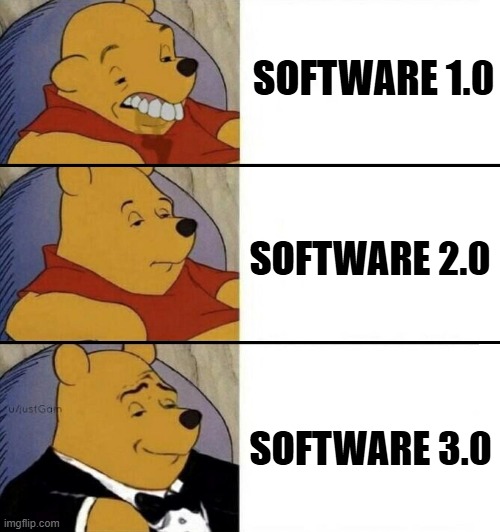
- Software 1.0: Classic manually written code (choose whatever language you like here). Logic defined by the programmer.
- Software 2.0: Neural networks. You don't write code directly, but optimize weights based on data.
- Software 3.0: LLMs as programmable units. Prompt in natural language (insert the language you operate in here. P.S. The Polish language is a leader in communication with AI!).
Both my engineering thesis and the Tesla autopilot example cited by Karpathy are representatives of the Software 2.0 era.
In both cases, neural networks replace classic code in specific, narrow applications. Karpathy describes this as a process where "Software 2.0" consumes "Software 1.0", eliminating thousands of lines of manually written code (e.g., in C++).
Despite their advancement, both systems share the same limitation – a lack of general intelligence. Neither my stock market model nor Tesla's autopilot would be able to answer a simple question: how long should you boil an egg for it to be soft-boiled?
The Great Change: November 30, 2022
This date is not the exact start of the Software 3.0 revolution, but the launch of the website chatgpt.com. It changed everything. Today, writing this at the beginning of 2026 (more than 3 years after the site's launch), we have dozens of major players in LLMs and thousands of tools we can use.
So, after a slightly long introduction, the questions become justified:
- Are we already addicted to LLMs and should we be afraid of it?
- What will programming look like in the future?
- Will LLMs replace all other applications?
Should We Fear Addiction to AI?
"AI is the new electricity" — Andrew Ng
In the view described by Andrew Ng, artificial intelligence is the equivalent of electrification. Striking similarities point to this:
| Feature | Electricity | AI (LLM) |
|---|---|---|
| CapEx/OpEx | Grid construction vs Transmission | Model training vs API Cost |
| Unit | Kilowatt-hour (kWh) | Tokens |
| Quality | Constant voltage | Low latency, uptime |
| Redundancy | Grid/Solar/Generator | Model switching (Claude/Gemini) |
Karpathy Compares AI More to an Operating System
| Component | Traditional OS System | AI Model (LLM) |
|---|---|---|
| Central Unit | CPU/Kernel | Model weights (processing and logic) |
| Random Access Memory | RAM | Context Window |
| Mass Storage | Hard Drive (HDD) | RAG / Vector Databases |
| Interface | Shell / Terminal | Chat (Natural Language) |
| Time Management | Time-sharing (sharing mainframe access) | Cloud access (API) - we all use one "intelligence" |
Conclusion? It doesn't matter if we look at language models through the eyes of Andrew Ng or Andrej Karpathy. Both comparisons lead to one thing: in the era of electrification and computerization, people were also full of skepticism. Do we worry every day today that we won't be able to do anything without electricity? No. Over time, exactly the same will happen with our approach to LLMs.
What Will Programming Look Like in the Future?
Or maybe it already looks like that today?
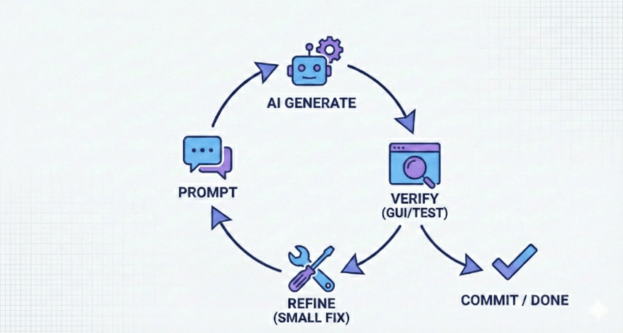
Programming using artificial intelligence consists of defining requirements using natural language and sending them to the AI, followed by verification. If we are not satisfied with the answer, we repeat the process (feedback loop).
What Else Can We Influence and Improve?
-
Verification Optimization:
- Using GUI to visualize changes (the brain catches graphic differences faster than text).
- Working on small "chunks" – smaller scope means faster testing and lower risk of error.
-
Incremental Workflow (Keeping AI on a Leash):
- Instead of asking for finished code, ask for approaches.
- Choose one, verify with documentation, test, commit.
- Iterate in small steps.
-
Investment in Prompting:
- Weak prompt = multiple corrections (waste of time).
- Good prompt = goal, requirements, edge cases, and constraints.
Example of Better Prompting
Instead of: "Write a rate limiter in Python", use:
- Goal: Token bucket rate limiter.
- Requirements: 10 req/min, identification by
user_id, thread-safety.- Context: Edge cases (system time change, memory cleanup).
- Constraints: Only
stdlib, readability over optimization.
In the case of small applications, coding becomes the easier part of the project. As of today, DevOps and "clicking through pages" to launch a project LIVE may take more time.
"AI-Native" Documentation
Traditional documentation is inefficient for LLMs. To maximize the potential of AI, content optimized for context must be created.
- No Images: AI handles pure text (Markdown) best.
- Action Semantics: Instead of "click button X", describe the action: "perform a POST request to endpoint Y".
- Structure: Logical description of processes, not a visual instruction.
Supporting Tools:
- Gitingest: Turns a repository into a single text file (context for LLM).
- Deepwiki: Creates a repository map for better architectural understanding.
Why is this important? Most of the time working with AI is wasted explaining "how something works". Providing data in an "AI-digestible" format drastically reduces verification time.
Future: Hybrid Applications and "Autonomous Slider"
Will programmers disappear? The era of "one app for everything" (like ChatGPT) is giving way to applications with partial autonomy. These are hybrids combining LLM models with a traditional graphical interface.
Autonomous Slider
This is an interface concept where the user decides how much freedom to give AI at a given moment.
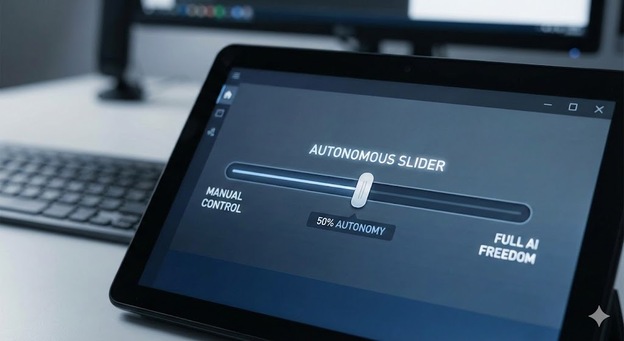
Autonomy Levels (using Cursor as an example):
- Low (Tab): Simple autocomplete (Co-pilot).
- Medium (Cmd + K): Editing a selected fragment.
- High (Cmd + L): Conversation about the entire project, planning.
- Highest (Cmd + I): "Architect" mode – AI independently creates and edits files (You only approve).
Challenge: Rewriting tools like Photoshop to this model. How is AI supposed to understand layers? How to show the user the difference (diff) in graphics? These are questions we will be looking for answers to in the coming years.